
Vestaboard Note ships with a 19.7" (50cm) power cable, which is designed for concealed wall mount installations where the outlet is directly behind the display. If your outlet is farther away, you'll want to plan accordingly before mounting or placing your Note.
Planning your wall installation? Download a copy of the wall template included inside your packaging. Perfect for sharing with your electrician or printing to size in advance.
Option 1: Recessed Outlet Behind the Display (Recommended)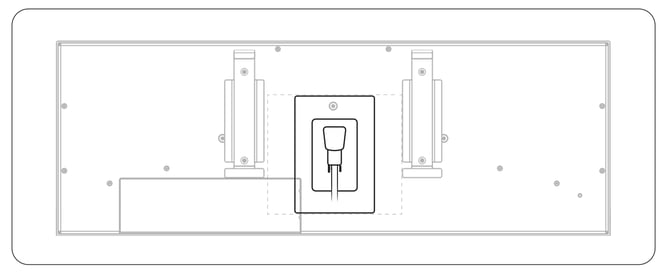
-
This is the cleanest option and the one we recommend for new installations. A recessed outlet sits flush with or inside the wall, allowing the Note to hang flat against the surface with the cable completely hidden.
-
If you're planning a new installation or renovation, we recommend having an electrician install a recessed outlet at the appropriate height before you mount your Note.
Option 2: Standard Outlet Behind the Display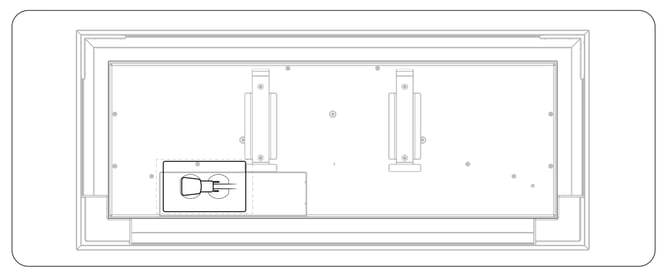
-
A standard horizontal wall outlet positioned behind the Note can also work, particularly if you're using the optional wall frame. The frame provides enough depth to accommodate a standard outlet plate behind the display.
Option 3: Standard Outlet Below the Display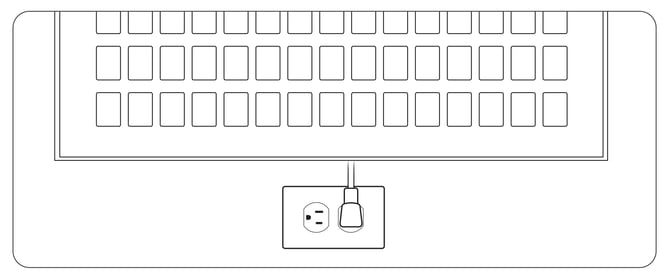
-
If relocating an outlet isn't practical, you can use an outlet below the display. In this case, you'll likely need a longer power cable. Vestaboard offers an 8' (2.5m) accessory cable in both black and white finishes at vestaboard.com/cords.
Freestanding / Shelf Placement
-
If you're placing your Note frameless on a shelf, desk, or countertop, simply route the power cable through the cutout on the back of the unit to the nearest available outlet. The rear cable channel helps keep things tidy regardless of outlet position.
Power Cable Details
- Included cable: 19.7" (50cm) IEC 320 C5 power cable
- Optional cable: 8' (2.5m), available in black and white at vestaboard.com/cords
- Connector type: IEC 320 C5 (3-prong clover-leaf style)
Installation Tip
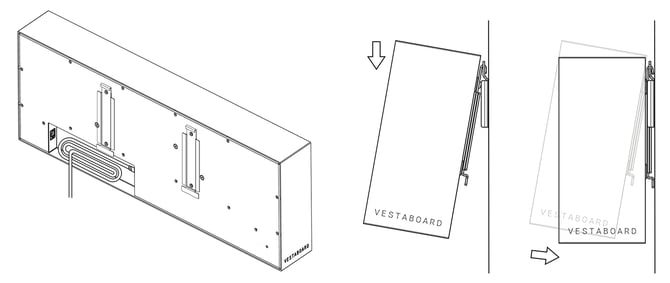
For wall-mounted installations, always plug the power cable into the power jack on the back of the Note before attaching it to the wall plate. If your outlet is behind the display, you can tilt the Note toward you while it's secured to the wall plate to plug in the cable.
Quick Reference
| Outlet Type | Best For | Cable Needed |
|---|---|---|
| Recessed behind display | Cleanest wall mount | Included 19.7" cable |
| Standard behind display | Wall mount with frame | Included 19.7" cable |
| Standard below display | Existing outlet, no renovation | Optional 8' cable |
| Nearby outlet (shelf/desk) | Freestanding frameless setup | Either cable, depending on distance |
For additional support or guidance on planning your installation, contact us.