Before You Begin
-
Make sure your preferred Wi-Fi network is active and functioning.
-
Stay within about 10 feet of your Vestaboard, and ensure your mobile device is connected to the same network you want your Vestaboard to join.
-
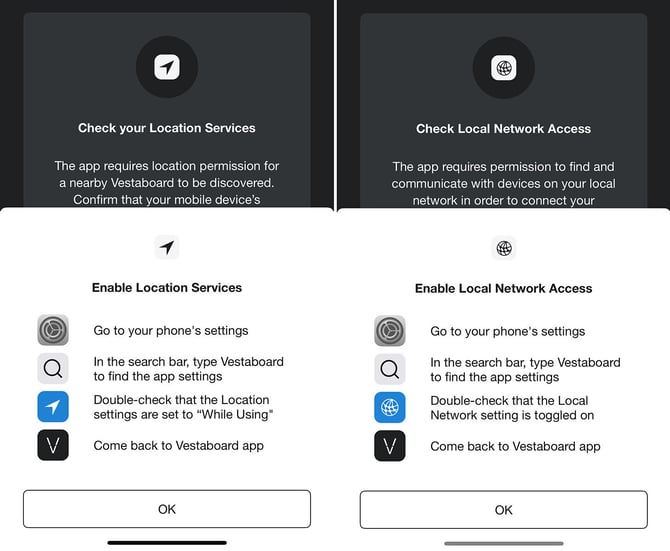
Confirm that location services and local network access are enabled on your device.
-
For private networks, double-check your Wi-Fi password.
-
The mobile app supports standard SSID/password and open network configurations. If you’re using an Enterprise network, please contact us for assistance.
Initiate Recovery Mode
To start, lift the bottom of the Vestaboard frame toward you for 10 seconds, then set it back in place. Depending on your firmware version, you’'ll see either a rainbow pattern or a recovery mode message.
Connect Using the Mobile App
-
Open the Vestaboard mobile app on a phone with active cellular service.
-
Tap the gear icon in the lower-right corner to access Settings, then select Connected Network.
-
Follow the prompts to connect your Vestaboard to Wi-Fi.
-
After connecting, allow up to five minutes for the app to show an updated Online status.
-
Avoid deleting the Vestaboard from your account or attempting to reconnect prematurely.
If You Encounter Issues
-
Check the Vestaboard Hotspot: Power cycle your Vestaboard and initiate Recovery Mode again. On your mobile device, look for the Vestaboard hotspot (e.g., Vestaboard-XXXXXXXX). If it doesn’t appear, reach out to us for assistance.
-
Connect via Ethernet: If Wi-Fi isn’t working, try connecting your Vestaboard with an Ethernet cable. This can help our onboarding team troubleshoot more effectively.
-
Schedule a Troubleshooting Session: If you're still having trouble, you can schedule a real-time troubleshooting session with one of our onboarding specialists.
Common Issues to Check
-
Location Services aren't enabled on your mobile device.
-
Local network access isn’t granted on your mobile device.
-
The Wi-Fi password entered is incorrect.
For additional support, we're happy to arrange a Zoom call to help get your Vestaboard online.